Explore key tools, smart features, and expert insights...
The Proxy Bypass Attempt
Imagine a worker who wants to access a streaming video site that the company firewall currently blocks to preserve bandwidth. To get around this restriction, the employee searches for a free web proxy or anonymizer site, hoping to route their traffic invisibly. They intend to bypass productivity controls and stream their content undetected.
The Risk of Anonymizer Sites
While the employee's goal might just be entertainment, the method they use introduces a severe security vulnerability. Proxy sites and anonymizers purposefully route traffic outside of corporate visibility, bypassing established firewall rules and security filters. This creates a dangerous backdoor into the network. Many free proxy services are heavily monetized through malicious advertisements or are actively monitored by bad actors seeking to intercept sensitive data traversing their servers. Data sent to unsecured domains can be intercepted by Man-in-the-Middle attacks.
Enforcing Compliance with Chrome Enterprise Premium
To maintain a secure and compliant environment, IT administrators need tools that cannot be easily bypassed by savvy users. Chrome Enterprise Premium empowers organizations to enforce web policies directly at the endpoint. The platform allows administrators to restrict access to URLs based on category natively within the browser. When the user attempts to load the proxy or anonymizer site, the URL filtering engine recognizes the restricted category and stops the connection immediately, maintaining corporate compliance and preventing the establishment of an unsecured backdoor.
Upgrading to Chrome Enterprise Premium gives IT teams the comprehensive control they need to secure the browsing environment. Benefits of this targeted approach include:
Restricting access to URLs based on category to enforce acceptable use policies.
Strengthening the security posture to account for dynamic changes in a user's context.
Keeping users away from visiting harmful sites through real time protections.
Protecting applications in hybrid deployments from unauthorized external routing.
Exposing Shadow IT with the Chrome Readiness Tool
Users frequently attempt to bypass security rules using browser add-ons rather than just visiting proxy websites. The Chrome Readiness Tool is vital for uncovering these hidden evasion tactics. The tool counts all unique browser add-ons installed across the fleet.
Crucially, it flags Unverified extensions that have not been vetted for enterprise security standards. These tools could act as Trojan horses to inject ads or steal data. By running the Chrome Readiness Tool, administrators can identify exactly where users are attempting to bypass security controls, allowing IT to tighten their filtering categories effectively using Chrome Enterprise Premium.
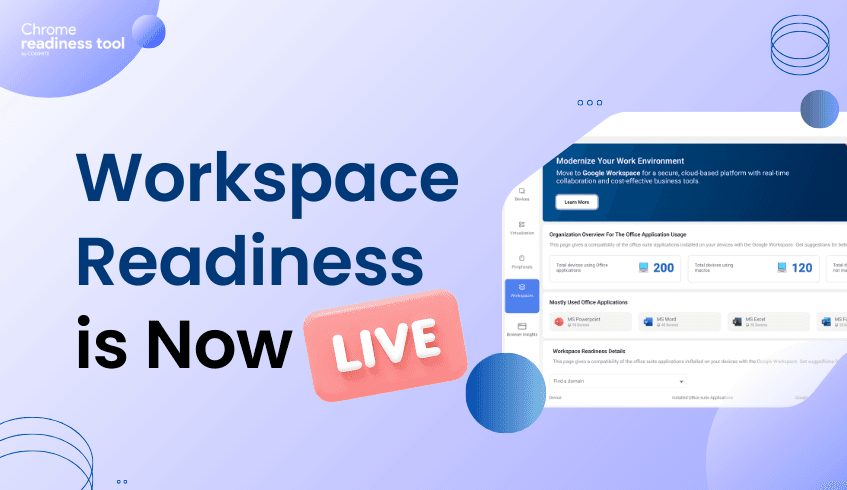
We are excited to announce that Workspace Readiness – Desktop version is now live in the Chrome Readiness Tool. This feature provides IT administrators with clear, data-driven visibility into how desktop installed office productivity applications are used across their organization.(Currently supported for Microsoft Office 365 and WPS only) Instead of relying on assumptions when planning cloud transitions, teams can now evaluate real usage data to determine readiness for Google Workspace.
As organizations continue adopting cloud-first strategies, reducing reliance on legacy desktop productivity software becomes an important step. However, moving away from established tools such as Microsoft Office requires careful planning. IT teams must understand application usage, technical dependencies, and potential compatibility issues before making the transition. Workspace Readiness – Desktop addresses this challenge by analyzing real-world application usage and highlighting where migration can proceed smoothly and where additional preparation may be required.
The feature begins with a high-level overview of desktop office suite applications usage across the organization. This allows administrators to understand the overall scale of dependency on legacy tools before initiating migration planning.
Key insights available at the organizational level include:
Office application usage overview Displays the total number of devices currently running office applications across the organization.
Macro dependency tracking Shows how many devices use macros and how many do not, helping teams quickly identify potential technical complexity.
Top application identification Highlights the five most widely used office applications, allowing compatibility planning to focus on the most important tools.
Beyond high-level metrics, Workspace Readiness – Desktop provides deeper device-level insights. These details help IT teams identify specific risks, understand application behavior, and uncover opportunities to optimize software usage.
The device-level view includes:
Installed versus used application analysis A visual comparison shows how many applications are installed versus how many are actively used, helping teams understand actual software requirements.
Unused application detection Applications that are not used at all by the user are automatically listed, allowing administrators to identify redundant software that may be removed.
Active usage metrics For applications that are actively used, the system shows total usage time in hours to help prioritize tools that employees rely on most.
Cloud transitions can sometimes stall due to technical limitations. Workspace Readiness – Desktop helps prevent this by identifying potential blockers early in the planning process.
The platform highlights several technical factors that may affect migration:
Macro usage detection Flags applications that use on macros, helping IT teams identify workflows that may require remediation.
Limitation indicators Displays potential compatibility file issues that could impact a migration to Google Workspace.
To simplify migration planning, the feature also maps legacy desktop applications to their Google Workspace equivalents.
Google Workspace suggestions Detected desktop applications are mapped directly to their corresponding Workspace tools, such as Microsoft Word, mapped to Google Docs.
Migration decision support These mappings help administrators quickly determine which users and applications are ready for transition.
With Workspace Readiness – Desktop version now available in the Chrome Readiness Tool, organizations can replace assumptions with real usage insights. By combining organizational visibility, device-level analysis, and clear technical indicators, IT teams can reduce migration risks, optimize software environments, and move toward Google Workspace with greater confidence.
The Home Office Download
A human resources director is working from a personal home computer for the afternoon. They log into the corporate portal and attempt to download a highly confidential payroll report directly to their local desktop. This computer is a shared family device lacking corporate security agents and proper endpoint management.
The Risk of Shared Personal Hardware
When employees work remotely, the line between corporate and personal hardware blurs. Allowing sensitive files to reside on unmanaged, personally owned devices creates a massive compliance and security risk. If a family member downloads a malicious game or clicks a phishing link on that same machine, the locally saved payroll report becomes immediately vulnerable to theft, unauthorized viewing, or ransomware encryption.
Granular Data Loss Prevention in Chrome Enterprise Premium
Organizations must ensure that sensitive data stays within approved boundaries regardless of where the user is working. Chrome Enterprise Premium tackles this challenge by offering common signals enterprises can take into account when making a policy decision, including whether the hardware is an enterprise-managed device or a personally-owned device. Based on predefined rules, Chrome Enterprise Premium can prevent data leaks by controlling actions such as copying, pasting, downloading, and printing. The system evaluates the context and prevents the intentional download of the sensitive payroll report to the unmanaged hardware, keeping the data safely within the approved cloud environment.
With Chrome Enterprise Premium, IT teams can establish a robust security model that provides several key advantages for remote workers:
Unlock access to personally-owned devices based on granular access policies.
Allow non-employees to access data from their personal or mobile devices as long as they meet a minimum security posture.
Enforce device security postures for employees, contractors, partners, and customers for access, no matter who manages the devices.
Categorizing Endpoints with the Chrome Readiness Tool
To implement effective data loss policies, you need to know exactly which devices are interacting with your network. The Chrome Readiness Tool gives you a clear Device Overview, which categorizes devices based on their risk level.
This allows IT to prioritize which users need immediate intervention. Deploy the Chrome Readiness Tool to identify your unmanaged endpoints, and then apply Chrome Enterprise Premium to secure your data across those devices.
The Developer's Forum Download
Imagine a software developer working on a tight deadline who needs a niche coding utility to streamline their workflow. They search online and find a zipped folder containing the tool on a popular community forum. However, the forum has been quietly compromised by malicious actors. The downloadable utility is bundled with a silent script designed to open a backdoor into the corporate network, completely hidden from the developer's view.
The Hidden Cost of Flexibility
Technical teams require a high degree of flexibility to explore new tools and maintain productivity. However, this flexibility introduces significant risk when employees download unvetted software from unverified sources. Shadow IT and unsanctioned downloads can easily bypass traditional network firewalls, which often trust user-initiated traffic. If the developer downloads and extracts the compromised zipped folder, the silent script can execute automatically, granting attackers a foothold into the highly sensitive development environment where proprietary source code is stored.
Active Defense with Chrome Enterprise Premium Developers need the freedom to innovate, but IT departments require absolute security. Chrome Enterprise Premium bridges this gap by offering robust protections that operate seamlessly in the background. The platform includes Malware deep scanning, which is specifically designed to scan unknown or high-risk files. When the developer attempts to download the forum file, Chrome Enterprise Premium inspects the zipped folder using advanced sandboxing. It identifies the hidden script and blocks the download, neutralizing the threat while alerting the IT security team.
Implementing Chrome Enterprise Premium empowers organizations to protect their intellectual property without hindering technical teams. The solution provides essential capabilities, such as:
Providing malware protection with advanced sandboxing directly within Chrome.
Scanning unknown or high-risk files before they can execute on a local machine.
Automatically detecting and blocking unsafe downloads.
Providing threat and data protection alerting and reporting to keep IT teams informed.
Gaining Insights with the Chrome Readiness Tool Technical users frequently utilize unapproved tools and browser add-ons to customize their workspace. To understand the true scope of this behavior, IT leaders must deploy the Chrome Readiness Tool. This specialized dashboard provides an Organization-Wide Extension Overview, which shows which extensions are most popular and helps spot Shadow IT. These unverified tools have not been vetted for enterprise security standards and could act as Trojan horses to steal data. Use the Chrome Readiness Tool to audit your current environment, and then rely on Chrome Enterprise Premium to scan and block future threats automatically.
The Coffee Shop Connection
Consider a highly active sales executive who is waiting for a delayed flight at an international airport or working remotely from a local coffee shop. To stay productive, they connect to a public, unencrypted Wi-Fi network and open their browser to update sensitive client records within a private web app. Unfortunately, public networks are notoriously insecure. Hackers on the same network can actively intercept unencrypted traffic or deploy malicious scripts to steal active session data while the executive works.
The Danger of Unsecured Networks
When employees operate outside the traditional corporate perimeter, the network itself becomes a significant liability. Relying on standard username and password authentication does not protect the data payload as it travels across a public Wi-Fi connection. If an attacker successfully intercepts the session cookies over this unsecured domain, they can bypass passwords and multi-factor authentication entirely, gaining unfettered access to internal web applications and corporate databases.
Chrome Enterprise Premium to the Rescue
Protecting a highly mobile workforce requires intelligent security that adapts to the user's current environment. Chrome Enterprise Premium provides this adaptability through advanced Context-Aware Access Controls. Rather than relying solely on user credentials, Chrome Enterprise Premium uses location, IP addresses, and geolocations to determine access levels. Recognizing the high-risk, untrusted network environment of the airport Wi-Fi, the system restricts access to the internal SaaS application entirely or requires immediate step-up authentication.
By utilizing Chrome Enterprise Premium, administrators can build a robust defense that protects data regardless of where the employee is physically located. Key capabilities include:
Gating access based on a user's location or geographic region.
Protecting applications in hybrid deployments that use a mix of Google Cloud, other cloud service platforms, or on-premises resources.
Allowing all end users to be productive everywhere without compromising security.
Extending security standards with per-user session management and multifactor authentication.
Mapping the Risk with the Chrome Readiness Tool
To prepare for location and network-based policies, you must first understand how frequently your employees are exposing corporate data to risky environments. The Chrome Readiness Tool is specifically designed to uncover these hidden vulnerabilities across your fleet.
The Chrome Readiness Tool dashboard reports on critical Organization Risk Metrics. Specifically, it tracks instances of Unsecured Domain Access, monitoring when users visit sites that lack proper encryption or are known for hosting malicious content. Furthermore, it identifies patterns consistent with Session Theft, where attackers steal active login cookies. By utilizing the Chrome Readiness Tool, you can quantify exactly how much data is at risk on public networks, providing the clear evidence needed to deploy the powerful context-aware restrictions available in Chrome Enterprise Premium.
The Insider Threat Investigation
Imagine a scenario where a departing salesperson attempts to upload a massive folder of confidential client contracts to a personal cloud storage account just hours before their exit interview. The corporate security system successfully identifies sensitive data and blocks unauthorized transfers. However, the situation is far from resolved. The human resources and legal teams urgently need concrete proof of the incident to proceed with their exit protocols and potential legal actions.
The Missing Link in Data Protection
Many security platforms excel at stopping actions but fail entirely at documenting them. When an employee attempts a malicious data transfer, a standard firewall might simply drop the connection and generate a generic text alert. This leaves the security team with a notification of a blocked action but no actual context, no copy of the files in question, and no unalterable trail of evidence. Without the original payload, investigators cannot prove malicious intent or verify exactly which client records the departing employee tried to steal.
The Chrome Enterprise Premium Solution
It is not enough to simply block a threat; you must document it thoroughly. Chrome Enterprise Premium goes beyond standard security by offering an Evidence Locker designed to store files and incidents for investigation. When the salesperson attempts to upload the confidential contracts, the platform intercepts the transfer. While preventing the data leak by controlling the upload action, Chrome Enterprise Premium automatically securely saves a copy of the flagged files alongside detailed user and incident logs. This provides the corporate security team with an unalterable, secure record for comprehensive forensic investigation.
By utilizing Chrome Enterprise Premium, organizations equip their security teams with the tools necessary to handle complex insider threats. Essential capabilities include:
Utilizing the Evidence Locker to store files and incidents for investigation.
Gaining security insights that provide visibility into risky users, sensitive data transfers, and other security events.
Preventing accidental or intentional data leaks through granular DLP policies.
Receiving immediate threat and data protection alerting and reporting directly within Chrome.
Establishing Visibility with the Chrome Readiness Tool
Catching insider threats requires establishing a baseline of visibility across your fleet. The Chrome Readiness Tool’s web dashboard provides visibility into security risks that are often invisible to traditional tools.
To begin your security audit, review the Organization Risk Metrics section within the tool. This provides a summary of the specific security vulnerabilities found across the organization. By tracking these initial warning signs and anomalies, IT administrators can build the case for deploying Chrome Enterprise Premium and relying on its powerful investigation tools.

The Personal Webmail Trap
Consider an employee taking a quick coffee break and checking their personal webmail in a separate browser tab on their corporate machine. They spot an urgent email claiming they have a package delivery issue and click the provided tracking link. Unfortunately, this link redirects them to a highly convincing, malicious credential harvesting website designed to look exactly like a legitimate shipping portal.
The Vulnerability of the Open Web
Relying strictly on traditional network-level firewalls leaves a significant gap in your defense strategy. Because the employee accessed their personal email through a standard encrypted connection, the network firewall often cannot inspect the traffic to identify the malicious link. Once the user clicks the link, the phishing site loads directly within the browser, tricking the employee into entering corporate credentials or downloading hidden malware.
Proactive Defense with Chrome Enterprise Premium
Modern threats require security measures that operate natively where the user interacts with the web. Chrome Enterprise Premium enhances Chrome's built-in security for enterprises by providing advanced protections against these exact scenarios. The platform includes Real-time Phishing, Malware, and Sandboxing Protection to automatically detect and block phishing sites, malware, and unsafe downloads. When the employee attempts to load the malicious tracking link, Chrome Enterprise Premium evaluates the destination. It will restrict access to URLs based on category. The system recognizes the site as a phishing threat and displays a block page before the site can even load, neutralizing the attack instantly.
By implementing Chrome Enterprise Premium, organizations can deploy a robust security model that protects users everywhere. Key advantages of this approach include:
Automatically detecting and blocking phishing sites and unsafe downloads in real time.
Restricting access to URLs based on specific categories to enforce corporate compliance.
Shrinking the access perimeter to only those resources that an end user should be accessing.
Allowing all end users to be productive everywhere without compromising security.
Tracking Risky Behavior with the Chrome Readiness Tool
To understand how susceptible your organization is to web-based attacks, you must analyze your fleet's current browsing habits. The Chrome Readiness Tool provides a dashboard that highlights security risks often invisible to traditional tools.
The dashboard specifically tracks Unsecured Domain Access, which monitors when users visit sites that lack proper encryption or are known for hosting malicious content. The tool flags these instances. By utilizing the Chrome Readiness Tool, IT teams can review exactly how often employees navigate to risky corners of the web, providing the necessary justification to deploy the powerful URL filtering capabilities found in Chrome Enterprise Premium
The Unsanctioned AI Copy and Paste
A marketing manager is tasked with writing personalized emails for a massive client list. To save time, they copy a spreadsheet containing hundreds of customer names and email addresses and attempt to paste it into a free, unsanctioned generative AI tool. While the employee is simply trying to be efficient, this action places highly sensitive information at severe risk.
The Blind Spot of Traditional Security
Pasting corporate data into public AI models can violate strict compliance laws and compromise proprietary information. Unfortunately, traditional network firewalls and endpoint security tools often miss these subtle browser-level interactions. They are generally not designed to monitor a simple "copy and paste" action happening entirely within a single web page, creating a massive blind spot for data exfiltration.
Enforcing Control with Chrome Enterprise Premium
To secure data in the modern age, organizations need granular control over browser activities. Chrome Enterprise Premium enhances Chrome's built-in security for enterprises by providing Configurable Data Loss Prevention. This powerful feature helps prevent data leaks by controlling actions such as copying, pasting, downloading, and printing. When the marketing manager attempts to paste the client list into the AI tool, Chrome Enterprise Premium instantly detects the sensitive data format and blocks the action.
By adopting Chrome Enterprise Premium, your organization can leverage advanced Data Loss Prevention to secure your intellectual property. Key benefits include:
Prevent accidental or intentional data leaks through granular DLP policies.
Ensure employees are prevented from copying and pasting sensitive data into email or saving data into personal storage, such as Google Drive.
Provide DLP protections for corporate data.
Protect applications in hybrid deployments that use a mix of Google Cloud, other cloud service platforms, or on-premises resources.
Auditing AI Usage with the Chrome Readiness Tool
Are your employees already using risky AI extensions to process company data? Before you can enforce Data Loss Prevention, you need visibility into your current landscape. The Chrome Readiness Tool provides a specialized dashboard designed to help IT administrators assess their fleet's preparedness.
It provides an Organization-Wide Extension Overview that shows which extensions are used. The tool counts all unique browser add-ons installed across the fleet. Crucially, it highlights unverified extensions that have not been vetted for enterprise security standards and could act as Trojan horses to inject ads or steal data. Use the Chrome Readiness Tool to spot Shadow IT today.
The Disguised Vendor Invoice
Consider a busy finance department processing dozens of payments daily. A team member receives an urgent email appearing to be from a highly trusted vendor. The message contains a link to download an updated PDF invoice to resolve an outstanding balance. Unfortunately, the file is not a standard document. It is a highly sophisticated, zero-day malware payload disguised as an invoice, specifically engineered to infiltrate the corporate network the moment it is downloaded.
The Shortcomings of Basic Antivirus
Traditional endpoint protection relies heavily on known threat signatures to identify malicious software. When a completely new, zero-day threat emerges, standard antivirus software often fails to recognize the danger because the signature has not yet been cataloged. In this gap between a new threat's creation and its detection by legacy tools, organizations are highly vulnerable. If the finance employee clicks the link, the disguised payload can bypass basic perimeter defenses, execute on the local machine, and begin compromising sensitive financial data before the IT team is even aware of the breach.
The Chrome Enterprise Premium Advantage
To stop unknown threats, organizations need proactive defense mechanisms built directly into the browser. Chrome Enterprise Premium enhances built-in security by providing advanced malware protection with advanced sandboxing. When the user attempts to download the disguised invoice, Chrome Enterprise Premium intercepts the action. The Malware deep scanning feature actively analyzes unknown or high-risk files in a secure environment. The system identifies the hidden malicious behavior and blocks the download completely, ensuring the payload never reaches the user's local drive.
By upgrading to Chrome Enterprise Premium, organizations can secure their most critical workflows with advanced threat protection. Key security benefits include:
Scanning unknown or high-risk files to prevent sophisticated zero-day attacks.
Automatically detecting and blocking phishing sites, malware, and unsafe downloads in real time.
Utilizing malware protection with advanced sandboxing to isolate threats.
Allowing all end users to be productive everywhere without compromising security.
Assessing Vulnerabilities with the Chrome Readiness Tool
Before you can effectively stop zero-day threats, you must ensure your browser environment is properly updated. Outdated browsers are significantly more susceptible to these advanced attacks. The Chrome Readiness Tool serves as your diagnostic dashboard, providing a detailed Browser Versions table that lists specific version numbers active in your fleet. Using older versions is a major security risk as they lack the latest patches for Zero-Day exploits. By running the Chrome Readiness Tool, IT administrators can pinpoint exactly which devices require immediate updates, laying the necessary groundwork for deploying the deep scanning capabilities of Chrome Enterprise Premium.